Skip to content
  • Home
  • Recent
  • Tags
  • 0 Unread 0
  • Categories
  • Unreplied
  • Popular
  • GitHub
  • Docu
  • Hilfe
Skins
  • Light
  • Brite
  • Cerulean
  • Cosmo
  • Flatly
  • Journal
  • Litera
  • Lumen
  • Lux
  • Materia
  • Minty
  • Morph
  • Pulse
  • Sandstone
  • Simplex
  • Sketchy
  • Spacelab
  • United
  • Yeti
  • Zephyr
  • Dark
  • Cyborg
  • Darkly
  • Quartz
  • Slate
  • Solar
  • Superhero
  • Vapor

  • Default (No Skin)
  • No Skin
Collapse
ioBroker Logo

Community Forum

donate donate
  1. ioBroker Community Home
  2. Deutsch
  3. Tester
  4. Test Adapter ioBroker.backitup v3.1.x

NEWS

  • UPDATE 31.10.: Amazon Alexa - ioBroker Skill läuft aus ?
    apollon77A
    apollon77
    48
    3
    8.8k

  • Monatsrückblick – September 2025
    BluefoxB
    Bluefox
    13
    1
    2.2k

  • Neues Video "KI im Smart Home" - ioBroker plus n8n
    BluefoxB
    Bluefox
    16
    1
    3.2k

Test Adapter ioBroker.backitup v3.1.x

Scheduled Pinned Locked Moved Tester
backitupbackitup backupccuhistorymysqlredisrestorerestore backup
2.8k Posts 170 Posters 2.4m Views 113 Watching
  • Oldest to Newest
  • Newest to Oldest
  • Most Votes
Reply
  • Reply as topic
Log in to reply
This topic has been deleted. Only users with topic management privileges can see it.
  • B brumark

    Hallo
    Ich habe folgendes Problem mit meinem Raspberry Pi 4 im Zusammenhang mit Backitup:
    Oft wenn das Backup läuft (23:00 Uhr), beginnt die Netzwerkverbindung zu flappen, d.h. Interface eth0 geht down und kommt gleich wieder hoch. Meistens klappt das Backup trotzdem, aber nicht immer. Ich mache ein Backup von: ioBroker, InfluxDB, Javascript, Grafana und Jarvis.
    Hat einer von euch eine Idee was hier die Ursache sein könnte? Ich verwende das original Power Supply und im Log steht auch nie was über zu wenig Power.

    Vielen Dank für einen Tipp.

    Gruss, Christoph

    pi@ioBroker-RasPi20:~ $ dmesg -T
    [Tue Jun 21 23:00:42 2022] CIFS: Attempting to mount //192.168.1.21/backup/Backup_iobroker
    [Wed Jun 22 23:00:43 2022] CIFS: Attempting to mount //192.168.1.21/backup/Backup_iobroker
    [Wed Jun 22 23:02:26 2022] bcmgenet fd580000.ethernet eth0: Link is Down
    [Wed Jun 22 23:02:29 2022] bcmgenet fd580000.ethernet eth0: Link is Up - 1Gbps/Full - flow control off
    [Thu Jun 23 23:00:44 2022] CIFS: Attempting to mount //192.168.1.21/backup/Backup_iobroker
    [Thu Jun 23 23:02:02 2022] bcmgenet fd580000.ethernet eth0: Link is Down
    [Thu Jun 23 23:02:05 2022] bcmgenet fd580000.ethernet eth0: Link is Up - 1Gbps/Full - flow control off
    [Thu Jun 23 23:02:44 2022] bcmgenet fd580000.ethernet eth0: Link is Down
    [Thu Jun 23 23:02:46 2022] bcmgenet fd580000.ethernet eth0: Link is Up - 1Gbps/Full - flow control off
    [Thu Jun 23 23:02:50 2022] bcmgenet fd580000.ethernet eth0: Link is Down
    [Thu Jun 23 23:02:53 2022] bcmgenet fd580000.ethernet eth0: Link is Up - 1Gbps/Full - flow control off
    [Thu Jun 23 23:03:48 2022] bcmgenet fd580000.ethernet eth0: Link is Down
    [Thu Jun 23 23:03:51 2022] bcmgenet fd580000.ethernet eth0: Link is Up - 1Gbps/Full - flow control off
    [Fri Jun 24 23:00:45 2022] CIFS: Attempting to mount //192.168.1.21/backup/Backup_iobroker
    [Fri Jun 24 23:01:56 2022] bcmgenet fd580000.ethernet eth0: Link is Down
    [Fri Jun 24 23:01:59 2022] bcmgenet fd580000.ethernet eth0: Link is Up - 1Gbps/Full - flow control off
    [Fri Jun 24 23:03:21 2022] bcmgenet fd580000.ethernet eth0: Link is Down
    [Fri Jun 24 23:03:24 2022] bcmgenet fd580000.ethernet eth0: Link is Up - 1Gbps/Full - flow control off
    [Fri Jun 24 23:03:27 2022] bcmgenet fd580000.ethernet eth0: Link is Down
    [Fri Jun 24 23:03:31 2022] bcmgenet fd580000.ethernet eth0: Link is Up - 1Gbps/Full - flow control off
    [Fri Jun 24 23:03:34 2022] bcmgenet fd580000.ethernet eth0: Link is Down
    [Fri Jun 24 23:03:37 2022] bcmgenet fd580000.ethernet eth0: Link is Up - 1Gbps/Full - flow control off
    [Fri Jun 24 23:03:40 2022] bcmgenet fd580000.ethernet eth0: Link is Down
    [Fri Jun 24 23:03:43 2022] bcmgenet fd580000.ethernet eth0: Link is Up - 1Gbps/Full - flow control off
    [Fri Jun 24 23:04:08 2022] bcmgenet fd580000.ethernet eth0: Link is Down
    [Fri Jun 24 23:04:11 2022] bcmgenet fd580000.ethernet eth0: Link is Up - 1Gbps/Full - flow control off
    [Sat Jun 25 23:00:46 2022] CIFS: Attempting to mount //192.168.1.21/backup/Backup_iobroker
    [Sat Jun 25 23:01:51 2022] bcmgenet fd580000.ethernet eth0: Link is Down
    [Sat Jun 25 23:01:54 2022] bcmgenet fd580000.ethernet eth0: Link is Up - 1Gbps/Full - flow control off
    [Sat Jun 25 23:01:57 2022] bcmgenet fd580000.ethernet eth0: Link is Down
    [Sat Jun 25 23:01:59 2022] bcmgenet fd580000.ethernet eth0: Link is Up - 1Gbps/Full - flow control off
    
    Thomas BraunT Online
    Thomas BraunT Online
    Thomas Braun
    Most Active
    wrote on last edited by Thomas Braun
    #1983

    @brumark

    Was ist das für ein CIFS-Server auf der anderen Seite?
    Wie sehen die Einstellungen im Backitup diesbezüglich aus?

    Linux-Werkzeugkasten:
    https://forum.iobroker.net/topic/42952/der-kleine-iobroker-linux-werkzeugkasten
    NodeJS Fixer Skript:
    https://forum.iobroker.net/topic/68035/iob-node-fix-skript
    iob_diag: curl -sLf -o diag.sh https://iobroker.net/diag.sh && bash diag.sh

    B 1 Reply Last reply
    0
    • Thomas BraunT Thomas Braun

      @brumark

      Was ist das für ein CIFS-Server auf der anderen Seite?
      Wie sehen die Einstellungen im Backitup diesbezüglich aus?

      B Offline
      B Offline
      brumark
      wrote on last edited by
      #1984

      @thomas-braun
      Es ist ein Synology NAS und ich mounte das Verzeichnis mit den Optionen:

      • Username/Password
      • SMB type: 3.02
      • Mount as root
      • Delete old backups

      Das ist schon alles.

      1 Reply Last reply
      0
      • simatecS Online
        simatecS Online
        simatec
        Developer Most Active
        wrote on last edited by
        #1985

        Ab sofort steht die Version 2.4.10 auf Github und in kürze auch im latest zur Verfügung.

        Changelog

        2.4.10 (2022-07-05)

        • (simatec) Code cleaning
        • (simatec) dependencies updated
        • (simatec) Disclaimer added
        • (simatec) Travis Support removed
        • (simatec) Fix backup-download with ssl
        • Besuche meine Github Seite
        • Beitrag hat geholfen oder willst du mich unterstützen
        • HowTo Restore ioBroker
        amg_666A 1 Reply Last reply
        1
        • simatecS simatec

          Ab sofort steht die Version 2.4.10 auf Github und in kürze auch im latest zur Verfügung.

          Changelog

          2.4.10 (2022-07-05)

          • (simatec) Code cleaning
          • (simatec) dependencies updated
          • (simatec) Disclaimer added
          • (simatec) Travis Support removed
          • (simatec) Fix backup-download with ssl
          amg_666A Offline
          amg_666A Offline
          amg_666
          wrote on last edited by
          #1986

          @simatec iob auf nuc mit Debian6, slave raspi pi 3b+, beide Systeme up-to-date (bin im beta repository).
          Upgrade lief ohne Probleme durch, Test-Backup (manuell im Adapter angestoßen) lief "ewig" aber fehlerfrei :-) inklusive Sicherung per ftp auf ein NAS.
          Alles gut soweit.

          iobroker auf proxmox container

          Thomas BraunT 1 Reply Last reply
          1
          • amg_666A amg_666

            @simatec iob auf nuc mit Debian6, slave raspi pi 3b+, beide Systeme up-to-date (bin im beta repository).
            Upgrade lief ohne Probleme durch, Test-Backup (manuell im Adapter angestoßen) lief "ewig" aber fehlerfrei :-) inklusive Sicherung per ftp auf ein NAS.
            Alles gut soweit.

            Thomas BraunT Online
            Thomas BraunT Online
            Thomas Braun
            Most Active
            wrote on last edited by Thomas Braun
            #1987

            @amg_666 sagte in Test Adapter ioBroker.backitup v2.4.x:

            iob auf nuc mit Debian6

            Sicher? Debian 6 wäre 'Squeeze', das ist aber schon viele Jahre tot...

            Squeeze had benefited from Long Term Support (LTS) until the end of February 2016.

            Linux-Werkzeugkasten:
            https://forum.iobroker.net/topic/42952/der-kleine-iobroker-linux-werkzeugkasten
            NodeJS Fixer Skript:
            https://forum.iobroker.net/topic/68035/iob-node-fix-skript
            iob_diag: curl -sLf -o diag.sh https://iobroker.net/diag.sh && bash diag.sh

            amg_666A 1 Reply Last reply
            0
            • Thomas BraunT Thomas Braun

              @amg_666 sagte in Test Adapter ioBroker.backitup v2.4.x:

              iob auf nuc mit Debian6

              Sicher? Debian 6 wäre 'Squeeze', das ist aber schon viele Jahre tot...

              Squeeze had benefited from Long Term Support (LTS) until the end of February 2016.

              amg_666A Offline
              amg_666A Offline
              amg_666
              wrote on last edited by
              #1988

              @thomas-braun oh Mann, natürlich Debian10, proxmox ist (noch) 6.4

              iobroker auf proxmox container

              1 Reply Last reply
              0
              • simatecS simatec
                Aktuelle Test Version 3.1.0
                Veröffentlichungsdatum 02.03.2025
                Github Link https://github.com/simatec/ioBroker.backitup
                Wiki Link https://github.com/simatec/ioBroker.backitup/wiki

                Hier geht es um die aktuelle Version von ioBroker.backitup, nachdem der alte Thread langsam zu unübersichtlich wurde.
                Bitte gebt euer Feedback und eure Anregungen hier ab.

                3.1.0 (2025-03-02)

                • (Bluefox) Dependencies updated
                • (Bluefox) Vite added
                • (simatec) jsonConfig updated
                • (simatec) Fix month for history

                3.0.37 (2025-02-28)

                • (simatec) Fix CronJob

                3.0.36 (2025-02-26)

                • (simatec) Fix src-admin

                3.0.35 (2025-02-26)

                • (simatec) Fix src-admin

                3.0.34 (2025-02-26)

                • (simatec) Fix src-admin

                3.0.33 (2025-02-25)

                • (simatec) Fix cronjob
                • (simatec) Fix Backup Console

                3.0.32 (2025-02-24)

                • (simatec) Error handling for GoogleDrive fix
                • (simatec) globalDependencies updated
                • (simatec) Dependencies updated
                • (simatec) Design Fix

                3.0.31 (2024-11-30)

                • (simatec) Fix Tab Menu

                3.0.30 (2024-11-29)

                • (simatec) Fix Tab Menu

                3.0.29 (2024-11-29)

                • (simatec) Fix Tab Menu

                3.0.28 (2024-11-27)

                • (simatec) Dependencies updated
                • (simatec) eslint-config added
                • (bluefox) Allow to store files for up to ca 3 years
                • (Marc-Berg) Grafana Docu updated

                3.0.27 (2024-11-12)

                • (simatec) dependencies updated
                • (simatec) Design Fix

                3.0.26 (2024-10-16)

                • (simatec) Fix FTP Connections
                • (simatec) dependencies updated
                • (simatec) Issue Workflow added

                3.0.25 (2024-09-26)

                • (bluefox) Improvement of Google Drive authentication workflow
                • (bluefox) Removed gulp from a build process
                • (simatec) small Design Fix
                • (simatec) Fix for Admin 7.1.5
                • (simatec) Fix Test & Release
                • (simatec) Fix ESlint errors

                3.0.22 (2024-09-03)

                • (simatec) Fix Notification Instance
                • (simatec) Fix Notification Design
                • (simatec) Fix Default Settings

                3.0.21 (2024-09-01)

                • (simatec) Fix Onedrive Notification
                • (simatec) Fix Zigbee2MQTT Backup
                • (simatec) dependencies updated

                3.0.20 (2024-08-22)

                • (simatec) Responsive Design for Tab added
                • (simatec) Responsive Design for jsonConfig added
                • (simatec) dependencies updated

                3.0.19 (2024-08-15)

                • (simatec) Fix CCU Backup
                • (simatec) Fix InfluxDB Backup Config
                • (simatec) Fix Backup-Log for Slave Instanz

                3.0.18 (2024-08-14)

                • (simatec) Package optimisation
                • (simatec) Fix the warning when opening the configuration
                • (simatec) dependencies updated

                3.0.17 (2024-08-12)

                • (simatec) Fix io-package for Release
                • (simatec) manual-review added
                • (simatec) Fix Slave Backup
                • (simatec) dependencies updated

                3.0.16 (2024-08-05)

                • (bluefox) dependencies updated
                • (simatec) Rename json5 Files

                3.0.15 (2024-08-03)

                • (simatec) fix dependencies

                3.0.14 (2024-08-02)

                • (simatec) dependencies updated
                • (simatec) Improved log outputs

                3.0.12 (2024-08-01)

                • (simatec) Backup Log for History added
                • (simatec) Added separate selection for deleting FTP backups
                • (simatec) Added separate selection for deleting Onedrive backups
                • (simatec) Added separate selection for deleting Webdav backups
                • (simatec) Added separate selection for deleting Dropbox backups
                • (simatec) Added separate selection for deleting Googledrive backups
                • (simatec) Improved log outputs
                • (simatec) Source code cleaned up
                • (simatec) dependencies updated

                3.0.11 (2024-07-28)

                • (simatec) Design Fix
                • (simatec) dependencies updated

                3.0.10 (2024-07-22)

                • (simatec) Design Fix for Dark Mode
                • (bluefox) dependencies updated

                3.0.9 (2024-07-11)

                • (simatec) Tab Icons added
                • (simatec) small fix
                • (simatec) Docu updated

                3.0.8 (2024-07-01)

                • (Grothesk242/simatec) forceuid and forcegid added
                • (simatec) dependencies updated
                • (simatec) small fix

                3.0.7 (2024-06-26)

                • (simatec) Restore Information added
                • (simatec) Fix Formaterrors
                • (bluefox) Fixing the problems with styles
                • (simatec) Fix iobroker Backup Error

                3.0.6 (2024-06-26)

                • (simatec) Restore Information added
                • (simatec) Fix Formaterrors
                • (bluefox) Fixing the problems with styles
                • (simatec) Fix iobroker Backup Error

                3.0.5 (2024-06-18)

                • (simatec) Fix Build

                3.0.4 (2024-06-18)

                • (simatec) History Gui Fix
                • (simatec) Tab GUI modified
                • (bluefox) Added support for Admin 7
                • (simatec) Onedrive ready for School/Business Accounts

                3.0.3 (2024-06-10)

                • (simatec) Fixed WebDav
                • (simatec) Admin Notification for Backup errors added
                • (simatec) Remove Sentry Config
                • (simatec) Translations updated
                • (simatec) Error handling optimized
                • (simatec) dependencies updated

                3.0.2 (2024-06-06)

                • (simatec) Fixed Google Drive
                • (simatec) Fixed Translations
                • (simatec) Fixed Onedrive
                • (simatec) Fixed MySql Backup
                • (simatec) Fixed Translation added
                • (simatec) Design Fix
                • (simatec) new notifications content added

                3.0.1 (2024-05-29)

                • (simatec) Fixed umount callback
                • (simatec) Fixed Backup Message
                • (simatec) Translations updated
                • (simatec) Fixed InfluxDB Multi Backup
                • (simatec) Fixed Restore Console
                • (simatec) Fixed Backup Console

                3.0.0 (2024-05-28)

                • (simatec) jsonConfig added
                • (bluefox) Conversion to React
                • (bluefox) Added react components
                • (bluefox/simatec) Working on React GUI
                • (simatec) dependencies updated
                • (simatec) Fix Yahka Backup
                • (simatec) Fix Nodered Backup
                • (simatec) some bugs fixed
                • (bluefox/simatec) New Restore-Interface
                • (simatec) Translation updated

                qqolliQ Offline
                qqolliQ Offline
                qqolli
                wrote on last edited by
                #1989

                @simatec
                Hallo,

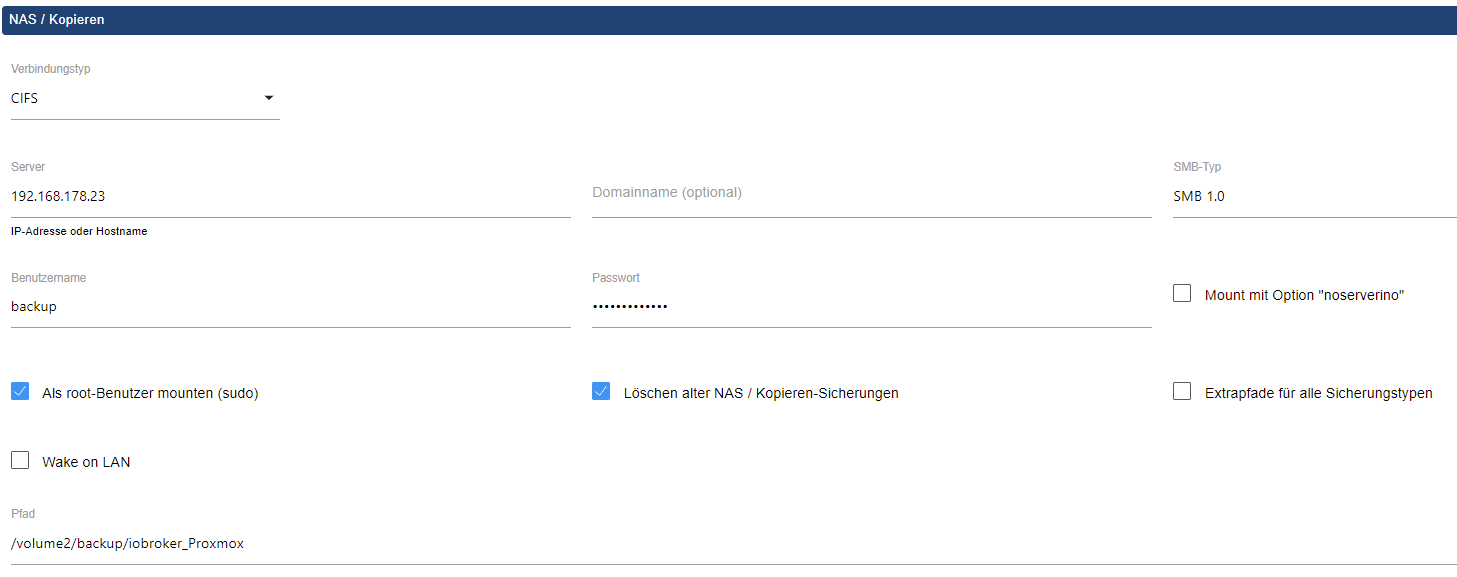
                nachdem ich es leider nicht auf meinem Raspberry-System zum laufen bekommen habe, jetzt alles auf Proxmox installiert und leider (noch) keinen Erfolg gehabt.

                Die Einstellungen im Adapter sind:
                10b44d70-fe85-4dfe-af67-50717ee465d9-image.png

                Fehlermeldung:

                Started iobroker ...
                [DEBUG] [mount] - noserverino option: false
                [DEBUG] [mount] - cifs-mount command: "sudo mount -t cifs -o username=backup,password=****,rw,file_mode=0777,dir_mode=0777,vers=1.0 //192.168.178.23/volume2/backup/iobroker_Proxmox /opt/iobroker/backups"
                [DEBUG] [mount] - first mount attempt with smb option failed. try next mount attempt without smb option ...
                [DEBUG] [mount] - cifs-mount command: "sudo mount -t cifs -o username=backup,password=****,rw,file_mode=0777,dir_mode=0777 //192.168.178.23/volume2/backup/iobroker_Proxmox /opt/iobroker/backups"
                [ERROR] [mount] - [undefined Error: Command failed: sudo mount -t cifs -o username=backup,password=****,rw,file_mode=0777,dir_mode=0777 //192.168.178.23/volume2/backup/iobroker_Proxmox /opt/iobroker/backups
                mount error(1): Operation not permitted
                Refer to the mount.cifs(8) manual page (e.g. man mount.cifs) and kernel log messages (dmesg)
                
                [ERROR] [mount] - Error: Command failed: sudo mount -t cifs -o username=backup,password=****,rw,file_mode=0777,dir_mode=0777 //192.168.178.23/volume2/backup/iobroker_Proxmox /opt/iobroker/backups
                mount error(1): Operation not permitted
                Refer to the mount.cifs(8) manual page (e.g. man mount.cifs) and kernel log messages (dmesg)
                

                Bei der Pfadangabe habe ich es auch ohne volume2 und dann mit und ohne "/" versucht, ebenso mit SMB bis Version 3. Leider kein Erfolg.

                HomoranH 1 Reply Last reply
                0
                • qqolliQ qqolli

                  @simatec
                  Hallo,

                  nachdem ich es leider nicht auf meinem Raspberry-System zum laufen bekommen habe, jetzt alles auf Proxmox installiert und leider (noch) keinen Erfolg gehabt.

                  Die Einstellungen im Adapter sind:

                  10b44d70-fe85-4dfe-af67-50717ee465d9-image.png

                  Fehlermeldung:

                  Started iobroker ...
                  [DEBUG] [mount] - noserverino option: false
                  [DEBUG] [mount] - cifs-mount command: "sudo mount -t cifs -o username=backup,password=****,rw,file_mode=0777,dir_mode=0777,vers=1.0 //192.168.178.23/volume2/backup/iobroker_Proxmox /opt/iobroker/backups"
                  [DEBUG] [mount] - first mount attempt with smb option failed. try next mount attempt without smb option ...
                  [DEBUG] [mount] - cifs-mount command: "sudo mount -t cifs -o username=backup,password=****,rw,file_mode=0777,dir_mode=0777 //192.168.178.23/volume2/backup/iobroker_Proxmox /opt/iobroker/backups"
                  [ERROR] [mount] - [undefined Error: Command failed: sudo mount -t cifs -o username=backup,password=****,rw,file_mode=0777,dir_mode=0777 //192.168.178.23/volume2/backup/iobroker_Proxmox /opt/iobroker/backups
                  mount error(1): Operation not permitted
                  Refer to the mount.cifs(8) manual page (e.g. man mount.cifs) and kernel log messages (dmesg)
                  
                  [ERROR] [mount] - Error: Command failed: sudo mount -t cifs -o username=backup,password=****,rw,file_mode=0777,dir_mode=0777 //192.168.178.23/volume2/backup/iobroker_Proxmox /opt/iobroker/backups
                  mount error(1): Operation not permitted
                  Refer to the mount.cifs(8) manual page (e.g. man mount.cifs) and kernel log messages (dmesg)
                  

                  Bei der Pfadangabe habe ich es auch ohne volume2 und dann mit und ohne "/" versucht, ebenso mit SMB bis Version 3. Leider kein Erfolg.

                  HomoranH Do not disturb
                  HomoranH Do not disturb
                  Homoran
                  Global Moderator Administrators
                  wrote on last edited by
                  #1990

                  @qqolli sagte in Test Adapter ioBroker.backitup v2.4.x:

                  habe ich es auch ohne volume2 und dann mit und ohne "/"

                  nur den Freigabenamen, keinen Pfad.
                  diesen jöchstens innerhalb der Freigabe

                  kein Support per PN! - Fragen im Forum stellen - es gibt fast nichts, was nicht auch für andere interessant ist.

                  Benutzt das Voting rechts unten im Beitrag wenn er euch geholfen hat.

                  der Installationsfixer: curl -fsL https://iobroker.net/fix.sh | bash -

                  qqolliQ 1 Reply Last reply
                  0
                  • HomoranH Homoran

                    @qqolli sagte in Test Adapter ioBroker.backitup v2.4.x:

                    habe ich es auch ohne volume2 und dann mit und ohne "/"

                    nur den Freigabenamen, keinen Pfad.
                    diesen jöchstens innerhalb der Freigabe

                    qqolliQ Offline
                    qqolliQ Offline
                    qqolli
                    wrote on last edited by
                    #1991

                    @homoran
                    Na ja, ohne den Pfad weiss er doch nicht, wo auf der NAS er das Backup hinschreiben soll:

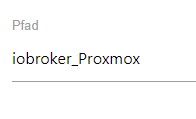
                    [ERROR] [mount] - [undefined Error: Command failed: sudo mount -t cifs -o username=backup,password=****,rw,file_mode=0777,dir_mode=0777 //192.168.178.23/iobroker_Proxmox /opt/iobroker/backups
                    mount error(1): Operation not permitted
                    

                    Ich hatte im Adapter nach deinem Hinweis folgendes eingetragen:
                    051849fc-99ef-49a8-9ef4-20491b9eeb73-image.png

                    qqolliQ HomoranH 2 Replies Last reply
                    0
                    • qqolliQ qqolli

                      @homoran
                      Na ja, ohne den Pfad weiss er doch nicht, wo auf der NAS er das Backup hinschreiben soll:

                      [ERROR] [mount] - [undefined Error: Command failed: sudo mount -t cifs -o username=backup,password=****,rw,file_mode=0777,dir_mode=0777 //192.168.178.23/iobroker_Proxmox /opt/iobroker/backups
                      mount error(1): Operation not permitted
                      

                      Ich hatte im Adapter nach deinem Hinweis folgendes eingetragen:

                      051849fc-99ef-49a8-9ef4-20491b9eeb73-image.png

                      qqolliQ Offline
                      qqolliQ Offline
                      qqolli
                      wrote on last edited by
                      #1992

                      @qqolli
                      @qqolli
                      Ich hab mal aus lauter Verzweiflung versucht, direkt auf den iob ein Backup anzustoßen, s. unten. Aber das scheint was gründlich schief gegangen zu sein, oder ich habe es einfach falsch gemacht.

                      Linux ioBroker 5.10.103-v7l+ #1529 SMP Tue Mar 8 12:24:00 GMT 2022 armv7l
                      
                      The programs included with the Debian GNU/Linux system are free software;
                      the exact distribution terms for each program are described in the
                      individual files in /usr/share/doc/*/copyright.
                      
                      Debian GNU/Linux comes with ABSOLUTELY NO WARRANTY, to the extent
                      permitted by applicable law.
                      Last login: Thu Jul  7 14:13:27 2022 from 192.168.178.49
                      pi@ioBroker:~ $ cd /opt/iobroker/
                      pi@ioBroker:/opt/iobroker $ iob stop
                      pi@ioBroker:/opt/iobroker $ iob backup
                      host.ioBroker 93442 states saved
                      host.ioBroker 122676 objects saved
                      
                      <--- Last few GCs --->
                      
                      [912:0x420a030]   106870 ms: Mark-sweep (reduce) 887.3 (920.9) -> 887.4 (916.4)                                                                                                                                                              MB, 533.5 / 0.0 ms  (+ 0.0 ms in 0 steps since start of marking, biggest step 0.                                                                                                                                                             0 ms, walltime since start of marking 2658 ms) (average mu = 0.859, current mu =                                                                                                                                                              0.812) last re[912:0x420a030]   107450 ms: Mark-sweep (reduce) 887.4 (916.4) ->                                                                                                                                                              887.3 (915.7) MB, 579.8 / 0.0 ms  (average mu = 0.731, current mu = 0.000) last                                                                                                                                                              resort GC in old space requested
                      
                      
                      <--- JS stacktrace --->
                      
                      FATAL ERROR: CALL_AND_RETRY_LAST Allocation failed - JavaScript heap out of memo                                                                                                                                                             ry
                      /usr/bin/iob: Zeile 8:   911 Abgebrochen             sudo -H -u iobroker node /o                                                                                                                                                             pt/iobroker/node_modules/iobroker.js-controller/iobroker.js "$@"
                      
                      Thomas BraunT 1 Reply Last reply
                      0
                      • qqolliQ qqolli

                        @qqolli
                        @qqolli
                        Ich hab mal aus lauter Verzweiflung versucht, direkt auf den iob ein Backup anzustoßen, s. unten. Aber das scheint was gründlich schief gegangen zu sein, oder ich habe es einfach falsch gemacht.

                        Linux ioBroker 5.10.103-v7l+ #1529 SMP Tue Mar 8 12:24:00 GMT 2022 armv7l
                        
                        The programs included with the Debian GNU/Linux system are free software;
                        the exact distribution terms for each program are described in the
                        individual files in /usr/share/doc/*/copyright.
                        
                        Debian GNU/Linux comes with ABSOLUTELY NO WARRANTY, to the extent
                        permitted by applicable law.
                        Last login: Thu Jul  7 14:13:27 2022 from 192.168.178.49
                        pi@ioBroker:~ $ cd /opt/iobroker/
                        pi@ioBroker:/opt/iobroker $ iob stop
                        pi@ioBroker:/opt/iobroker $ iob backup
                        host.ioBroker 93442 states saved
                        host.ioBroker 122676 objects saved
                        
                        <--- Last few GCs --->
                        
                        [912:0x420a030]   106870 ms: Mark-sweep (reduce) 887.3 (920.9) -> 887.4 (916.4)                                                                                                                                                              MB, 533.5 / 0.0 ms  (+ 0.0 ms in 0 steps since start of marking, biggest step 0.                                                                                                                                                             0 ms, walltime since start of marking 2658 ms) (average mu = 0.859, current mu =                                                                                                                                                              0.812) last re[912:0x420a030]   107450 ms: Mark-sweep (reduce) 887.4 (916.4) ->                                                                                                                                                              887.3 (915.7) MB, 579.8 / 0.0 ms  (average mu = 0.731, current mu = 0.000) last                                                                                                                                                              resort GC in old space requested
                        
                        
                        <--- JS stacktrace --->
                        
                        FATAL ERROR: CALL_AND_RETRY_LAST Allocation failed - JavaScript heap out of memo                                                                                                                                                             ry
                        /usr/bin/iob: Zeile 8:   911 Abgebrochen             sudo -H -u iobroker node /o                                                                                                                                                             pt/iobroker/node_modules/iobroker.js-controller/iobroker.js "$@"
                        
                        Thomas BraunT Online
                        Thomas BraunT Online
                        Thomas Braun
                        Most Active
                        wrote on last edited by Thomas Braun
                        #1993

                        @qqolli

                        JavaScript heap out of memory

                        Zu dickes Update oder irgendwas anderes quer installiert.

                        Schau ob nodejs senkrecht installiert ist.

                        Linux-Werkzeugkasten:
                        https://forum.iobroker.net/topic/42952/der-kleine-iobroker-linux-werkzeugkasten
                        NodeJS Fixer Skript:
                        https://forum.iobroker.net/topic/68035/iob-node-fix-skript
                        iob_diag: curl -sLf -o diag.sh https://iobroker.net/diag.sh && bash diag.sh

                        qqolliQ 1 Reply Last reply
                        0
                        • Thomas BraunT Thomas Braun

                          @qqolli

                          JavaScript heap out of memory

                          Zu dickes Update oder irgendwas anderes quer installiert.

                          Schau ob nodejs senkrecht installiert ist.

                          qqolliQ Offline
                          qqolliQ Offline
                          qqolli
                          wrote on last edited by
                          #1994

                          @thomas-braun
                          Hallo Thomas,

                          ja, da ist wohl irgendwas nicht ok, denn beim BackitUp-Adapter speichert er immer alles, außer dem iobroker-Backup.

                          Das hätte normalerweise so um die 35 MB.

                          Kann man z. B. "nur" den iob backupen, ohne Java etc.? Oder was könnte ich noch machen um der Sache auf die Spur zu kommen?

                          Thomas BraunT 1 Reply Last reply
                          0
                          • qqolliQ qqolli

                            @thomas-braun
                            Hallo Thomas,

                            ja, da ist wohl irgendwas nicht ok, denn beim BackitUp-Adapter speichert er immer alles, außer dem iobroker-Backup.

                            Das hätte normalerweise so um die 35 MB.

                            Kann man z. B. "nur" den iob backupen, ohne Java etc.? Oder was könnte ich noch machen um der Sache auf die Spur zu kommen?

                            Thomas BraunT Online
                            Thomas BraunT Online
                            Thomas Braun
                            Most Active
                            wrote on last edited by
                            #1995

                            @qqolli sagte in Test Adapter ioBroker.backitup v2.4.x:

                            Kann man z. B. "nur" den iob backupen, ohne Java etc.?

                            Das ganze Ding läuft in JavaSkript.
                            Schau halt Mal nach nodejs, das wird ja oft genug falsch installiert. Siehe meine Signatur.

                            Linux-Werkzeugkasten:
                            https://forum.iobroker.net/topic/42952/der-kleine-iobroker-linux-werkzeugkasten
                            NodeJS Fixer Skript:
                            https://forum.iobroker.net/topic/68035/iob-node-fix-skript
                            iob_diag: curl -sLf -o diag.sh https://iobroker.net/diag.sh && bash diag.sh

                            qqolliQ 1 Reply Last reply
                            0
                            • qqolliQ qqolli

                              @homoran
                              Na ja, ohne den Pfad weiss er doch nicht, wo auf der NAS er das Backup hinschreiben soll:

                              [ERROR] [mount] - [undefined Error: Command failed: sudo mount -t cifs -o username=backup,password=****,rw,file_mode=0777,dir_mode=0777 //192.168.178.23/iobroker_Proxmox /opt/iobroker/backups
                              mount error(1): Operation not permitted
                              

                              Ich hatte im Adapter nach deinem Hinweis folgendes eingetragen:

                              051849fc-99ef-49a8-9ef4-20491b9eeb73-image.png

                              HomoranH Do not disturb
                              HomoranH Do not disturb
                              Homoran
                              Global Moderator Administrators
                              wrote on last edited by
                              #1996

                              @qqolli sagte in Test Adapter ioBroker.backitup v2.4.x:

                              ohne den Pfad weiss er doch nicht, wo auf der NAS er das Backup hinschreiben soll:

                              dafür definierst du ja eine Freigabe auf dem NAS. Der Freigabename reicht

                              kein Support per PN! - Fragen im Forum stellen - es gibt fast nichts, was nicht auch für andere interessant ist.

                              Benutzt das Voting rechts unten im Beitrag wenn er euch geholfen hat.

                              der Installationsfixer: curl -fsL https://iobroker.net/fix.sh | bash -

                              qqolliQ 1 Reply Last reply
                              0
                              • Thomas BraunT Thomas Braun

                                @qqolli sagte in Test Adapter ioBroker.backitup v2.4.x:

                                Kann man z. B. "nur" den iob backupen, ohne Java etc.?

                                Das ganze Ding läuft in JavaSkript.
                                Schau halt Mal nach nodejs, das wird ja oft genug falsch installiert. Siehe meine Signatur.

                                qqolliQ Offline
                                qqolliQ Offline
                                qqolli
                                wrote on last edited by
                                #1997

                                @thomas-braun

                                Also da habe ich mich immer sklavisch an deine Vorgaben gehalten :-)

                                pi@ioBroker:~ $ uname -m && which nodejs node npm && nodejs -v && node -v && npm -v && whoami && pwd && sudo apt update &> /dev/null && sudo apt update && apt policy nodejs
                                armv7l
                                /usr/bin/nodejs
                                /usr/bin/node
                                /usr/bin/npm
                                v16.15.1
                                v16.15.1
                                8.11.0
                                pi
                                /home/pi
                                OK:1 http://phoscon.de/apt/deconz buster InRelease
                                OK:2 http://raspbian.raspberrypi.org/raspbian buster InRelease
                                OK:3 https://packages.grafana.com/oss/deb stable InRelease
                                OK:4 http://archive.raspberrypi.org/debian buster InRelease
                                OK:5 https://deb.nodesource.com/node_16.x buster InRelease
                                OK:6 https://repos.influxdata.com/debian buster InRelease
                                OK:7 https://archive.raspbian.org/raspbian buster InRelease
                                Paketlisten werden gelesen... Fertig
                                Abhängigkeitsbaum wird aufgebaut.
                                Statusinformationen werden eingelesen.... Fertig
                                Alle Pakete sind aktuell.
                                nodejs:
                                  Installiert:           16.15.1-deb-1nodesource1
                                  Installationskandidat: 16.15.1-deb-1nodesource1
                                  Versionstabelle:
                                 *** 16.15.1-deb-1nodesource1 500
                                        500 https://deb.nodesource.com/node_16.x buster/main armhf Packages
                                        100 /var/lib/dpkg/status
                                     10.24.0~dfsg-1~deb10u1 500
                                        500 http://raspbian.raspberrypi.org/raspbian buster/main armhf Packages
                                        500 https://archive.raspbian.org/raspbian buster/main armhf Packages
                                
                                1 Reply Last reply
                                0
                                • HomoranH Homoran

                                  @qqolli sagte in Test Adapter ioBroker.backitup v2.4.x:

                                  ohne den Pfad weiss er doch nicht, wo auf der NAS er das Backup hinschreiben soll:

                                  dafür definierst du ja eine Freigabe auf dem NAS. Der Freigabename reicht

                                  qqolliQ Offline
                                  qqolliQ Offline
                                  qqolli
                                  wrote on last edited by
                                  #1998

                                  @homoran
                                  Verstehe ich noch nicht ganz.

                                  Freigabe auf dem NAS für den Ordner Backup. Und dort ist der Ordner iobroker_Proxmox.

                                  Woher weiß denn der Adapter das er in backup schreiben muss auf der NAS?

                                  Die Fehlermeldung oben zeigt ja, das er das nicht weiß:

                                  [ERROR] [mount] - [undefined Error: Command failed: sudo mount -t cifs -o username=backup,password=****,rw,file_mode=0777,dir_mode=0777 //192.168.178.23/iobroker_Proxmox /opt/iobroker/backups
                                  mount error(1): Operation not permitted
                                  

                                  sonst würde er ja in backup schreiben, oder?

                                  Thomas BraunT HomoranH 2 Replies Last reply
                                  0
                                  • qqolliQ qqolli

                                    @homoran
                                    Verstehe ich noch nicht ganz.

                                    Freigabe auf dem NAS für den Ordner Backup. Und dort ist der Ordner iobroker_Proxmox.

                                    Woher weiß denn der Adapter das er in backup schreiben muss auf der NAS?

                                    Die Fehlermeldung oben zeigt ja, das er das nicht weiß:

                                    [ERROR] [mount] - [undefined Error: Command failed: sudo mount -t cifs -o username=backup,password=****,rw,file_mode=0777,dir_mode=0777 //192.168.178.23/iobroker_Proxmox /opt/iobroker/backups
                                    mount error(1): Operation not permitted
                                    

                                    sonst würde er ja in backup schreiben, oder?

                                    Thomas BraunT Online
                                    Thomas BraunT Online
                                    Thomas Braun
                                    Most Active
                                    wrote on last edited by
                                    #1999

                                    @qqolli sagte in Test Adapter ioBroker.backitup v2.4.x:

                                    Woher weiß denn der Adapter das er in backup schreiben muss auf der NAS?

                                    Weiß er nicht. Tut er auch nicht. Er legt das Backup immer in /opt/iobroker/backups ab. Aber du kannst das Verzeichnis als mountpunkt für andere Dateisysteme verwenden. Dazu muss das aber mit den richtigen Rechten auch dort eingehängt werden.

                                    Linux-Werkzeugkasten:
                                    https://forum.iobroker.net/topic/42952/der-kleine-iobroker-linux-werkzeugkasten
                                    NodeJS Fixer Skript:
                                    https://forum.iobroker.net/topic/68035/iob-node-fix-skript
                                    iob_diag: curl -sLf -o diag.sh https://iobroker.net/diag.sh && bash diag.sh

                                    1 Reply Last reply
                                    0
                                    • qqolliQ qqolli

                                      @homoran
                                      Verstehe ich noch nicht ganz.

                                      Freigabe auf dem NAS für den Ordner Backup. Und dort ist der Ordner iobroker_Proxmox.

                                      Woher weiß denn der Adapter das er in backup schreiben muss auf der NAS?

                                      Die Fehlermeldung oben zeigt ja, das er das nicht weiß:

                                      [ERROR] [mount] - [undefined Error: Command failed: sudo mount -t cifs -o username=backup,password=****,rw,file_mode=0777,dir_mode=0777 //192.168.178.23/iobroker_Proxmox /opt/iobroker/backups
                                      mount error(1): Operation not permitted
                                      

                                      sonst würde er ja in backup schreiben, oder?

                                      HomoranH Do not disturb
                                      HomoranH Do not disturb
                                      Homoran
                                      Global Moderator Administrators
                                      wrote on last edited by
                                      #2000

                                      @qqolli sagte in Test Adapter ioBroker.backitup v2.4.x:

                                      Freigabe auf dem NAS für den Ordner Backup

                                      hast du die freigegeben und dem user backup?? auch die Rechte gegeben?

                                      @qqolli sagte in Test Adapter ioBroker.backitup v2.4.x:

                                      Und dort ist der Ordner iobroker_Proxmox.

                                      der befindet sich innerhalb des Freigabeverzeichnisses?

                                      dann muss pfad sein: backups/iobroker_Proxmox

                                      @qqolli sagte in Test Adapter ioBroker.backitup v2.4.x:

                                      zeigt ja, das er das nicht weiß:

                                      weil die Freigabe fehlt, da steht nur

                                      @qqolli sagte in Test Adapter ioBroker.backitup v2.4.x:

                                      192.168.178.23/iobroker_Proxmox

                                      kein Freigabename. oder hast du iobroker_Proxmox freigegeben?

                                      kein Support per PN! - Fragen im Forum stellen - es gibt fast nichts, was nicht auch für andere interessant ist.

                                      Benutzt das Voting rechts unten im Beitrag wenn er euch geholfen hat.

                                      der Installationsfixer: curl -fsL https://iobroker.net/fix.sh | bash -

                                      qqolliQ 1 Reply Last reply
                                      0
                                      • HomoranH Homoran

                                        @qqolli sagte in Test Adapter ioBroker.backitup v2.4.x:

                                        Freigabe auf dem NAS für den Ordner Backup

                                        hast du die freigegeben und dem user backup?? auch die Rechte gegeben?

                                        @qqolli sagte in Test Adapter ioBroker.backitup v2.4.x:

                                        Und dort ist der Ordner iobroker_Proxmox.

                                        der befindet sich innerhalb des Freigabeverzeichnisses?

                                        dann muss pfad sein: backups/iobroker_Proxmox

                                        @qqolli sagte in Test Adapter ioBroker.backitup v2.4.x:

                                        zeigt ja, das er das nicht weiß:

                                        weil die Freigabe fehlt, da steht nur

                                        @qqolli sagte in Test Adapter ioBroker.backitup v2.4.x:

                                        192.168.178.23/iobroker_Proxmox

                                        kein Freigabename. oder hast du iobroker_Proxmox freigegeben?

                                        qqolliQ Offline
                                        qqolliQ Offline
                                        qqolli
                                        wrote on last edited by
                                        #2001

                                        @homoran
                                        Mit FTP habe ich es jetzt zum laufen gebracht. Ist es normal, das er auf dem iob die Backupdateien nicht löscht? Auch wenn ich z. B. sage max. 2 Backups werden es immer mehr. Aber zumindest auf der NAS landen sie jetzt.

                                        simatecS 1 Reply Last reply
                                        0
                                        • qqolliQ qqolli

                                          @homoran
                                          Mit FTP habe ich es jetzt zum laufen gebracht. Ist es normal, das er auf dem iob die Backupdateien nicht löscht? Auch wenn ich z. B. sage max. 2 Backups werden es immer mehr. Aber zumindest auf der NAS landen sie jetzt.

                                          simatecS Online
                                          simatecS Online
                                          simatec
                                          Developer Most Active
                                          wrote on last edited by
                                          #2002

                                          @qqolli Es wird nur bei automatischen Backups gelöscht. Wenn du ein manuelles Backup durchführst, wird nicht gelöscht.
                                          Wo hast du denn den ioBroker laufen? LXC oder VM?

                                          • Besuche meine Github Seite
                                          • Beitrag hat geholfen oder willst du mich unterstützen
                                          • HowTo Restore ioBroker
                                          qqolliQ 1 Reply Last reply
                                          0
                                          Reply
                                          • Reply as topic
                                          Log in to reply
                                          • Oldest to Newest
                                          • Newest to Oldest
                                          • Most Votes


                                          Support us

                                          ioBroker
                                          Community Adapters
                                          Donate

                                          379

                                          Online

                                          32.4k

                                          Users

                                          81.5k

                                          Topics

                                          1.3m

                                          Posts
                                          Community
                                          Impressum | Datenschutz-Bestimmungen | Nutzungsbedingungen | Einwilligungseinstellungen
                                          ioBroker Community 2014-2025
                                          logo
                                          • Login

                                          • Don't have an account? Register

                                          • Login or register to search.
                                          • First post
                                            Last post
                                          0
                                          • Home
                                          • Recent
                                          • Tags
                                          • Unread 0
                                          • Categories
                                          • Unreplied
                                          • Popular
                                          • GitHub
                                          • Docu
                                          • Hilfe